
Printer test page.
Print one. Then find out what it's telling you.
Colour, black and white, nozzle check and alignment patterns at true scale on Letter or A4. Print from the browser or take the PDF.
What a printer test page actually tells you
A printer test page is a sheet of known patterns. Because you know exactly what should come out of the printer, anything that comes out differently is a measurement rather than a guess. That is the whole idea, and it is why a test print is the first thing a repair shop does and the first thing you should do before buying a cartridge you may not need.
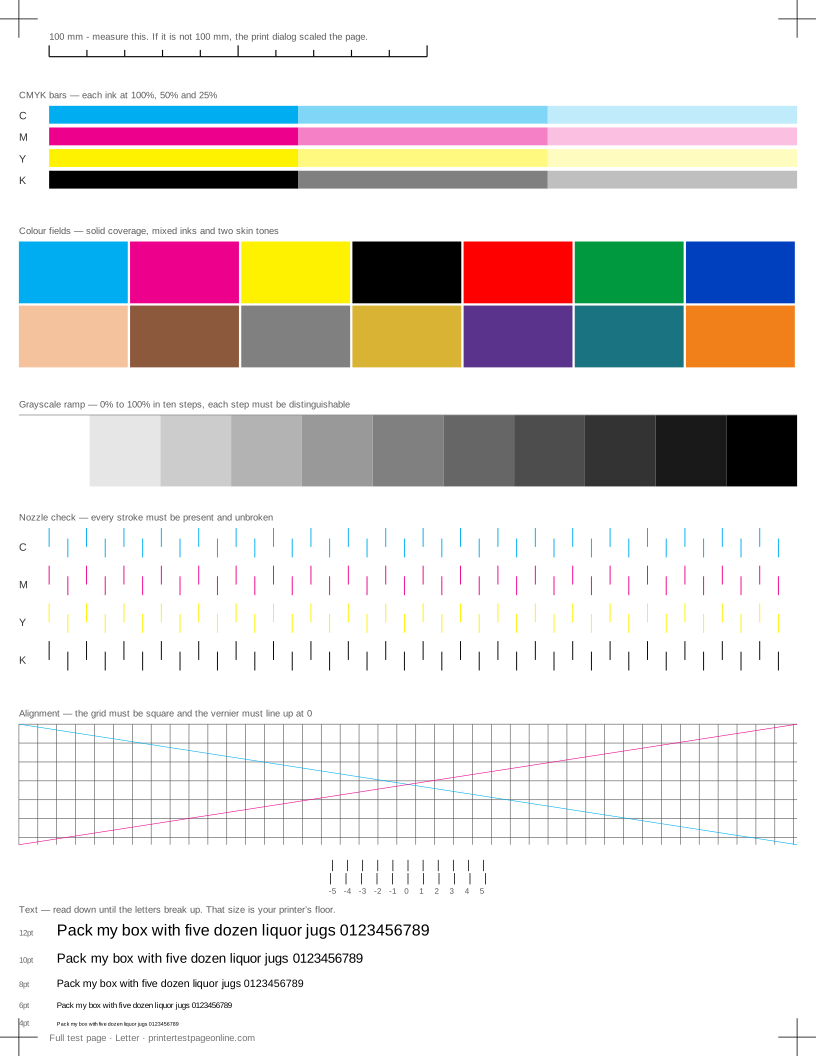
The sheet above carries seven blocks, each answering a different question. The CMYK bars show whether every ink reaches the paper at full, half and quarter coverage. The colour fields cover solids and two skin tones. The grayscale ramp steps white to black in ten steps, and every step has to be distinguishable from its neighbours. The nozzle check prints a row of short strokes per ink, where one missing stroke is one blocked nozzle. The alignment grid has to be square, and its vernier reads a head misalignment directly. The text block runs 12pt down to 4pt. And the 100 mm ruler tells you whether the print dialog quietly scaled the page, which would make every other measurement on the sheet meaningless.
Which test to print
Print the full test page if you do not know what is wrong yet. Print a single pattern when you already have a symptom and want a clean answer fast, or when ink is low and you do not want to spend it on a page of solid colour.
| Test | Prints | Best for |
|---|---|---|
| Full test page | 7 blocks | inkjet printers |
| Colour test page | 4 blocks | inkjet and laser printers |
| Black and white test page | 4 blocks | inkjet and laser printers |
| CMYK test page | 3 blocks | inkjet and laser printers |
| Grayscale test page | 3 blocks | inkjet and laser printers |
| Nozzle check | 2 blocks | inkjet printers |
| Alignment page | 2 blocks | inkjet and laser printers |
| Text sharpness | 2 blocks | inkjet and laser printers |
| Laser test page | 5 blocks | laser printers |
Every test prints on one sheet, on Letter and on A4, and every one of them is also available as a PDF if the machine you are reading this on is not the machine attached to the printer.
How to print a test page
Choose the paper that is in the tray, choose a test, and press Print this page. When the print dialog opens, the one setting that matters is scale: it has to be 100%, not "Fit to page" and not "Shrink oversized pages". Fit to page resizes the sheet by a percent or two, which is invisible to the eye and fatal to a measurement. Then check the printed ruler. If 100 mm on the paper measures 100 mm against a real ruler, the sheet is true scale and you can trust the alignment vernier, the stroke spacing on the nozzle check and the size of the text block.
You do not need the manufacturer's software for any of this. The page prints through whatever driver you already have, on Windows, macOS, Linux, ChromeOS, Android and iOS — including straight from a phone. For a second data point with no computer in the path, print the printer's own self-test page.
Reading the result
This is the part most test pages leave out. A sheet that shows a fault is only half an answer; the other half is what to do about it, in the order that costs least. Each fault below has its own page with the full sequence.
| What you see | Usually means | Where to start |
|---|---|---|
| Broken or missing lines in the nozzle-check grid | Dried ink is blocking some nozzles | Run one print-head cleaning cycle, print the nozzle check again, and stop after three cycles — more wastes ink and rarely helps. |
| One colour is missing from the CMYK bars | That cartridge is empty or not seated | Reseat the cartridge until it clicks, then reprint. Replace it if the bar is still blank. |
| Horizontal streaks or lines across the solid blocks | Partially clogged nozzles (inkjet) | Run one cleaning cycle and reprint the solid-black block. |
| Bands of uneven density in the ramp or colour fields | The print head is out of alignment | Run the printer’s head-alignment routine, then print the alignment page here to check the result. |
| The page came out completely blank | Tape or a seal is still on a new cartridge | Pull the cartridge and check every tab before anything else. |
| Colours print, but the wrong shade | The document and the driver disagree about colour | Print this sheet from the browser with colour management left at the default; if it is right here and wrong in your document, the fault is in the document’s profile, not the printer. |
| Everything prints pale or washed out | The driver is set to draft or eco mode | Set quality to Normal or Best in the print dialog and reprint. |
| The grid lines or registration marks do not line up | Bidirectional head alignment has drifted | Run the head-alignment utility, then reprint the alignment page. |
| Small text is fuzzy or has a shadow beside it | The driver is printing at draft resolution | Set quality to Normal or Best. Draft halves the dot density and 6pt text is the first thing to go. |
| The whole pattern sits crooked on the sheet | The paper guides are not holding the stack square | Square the guides against the stack so the sheet cannot rotate as it feeds, and reprint the alignment page. |
| Ink or toner smudges when you touch it | The fuser is not reaching temperature (laser) | If toner rubs off a cooled page, the fuser is failing and needs replacing. |
| The crop marks or edges are cut off | The print dialog is scaling the page | Set scale to 100% (not "Fit to page"), or the sheet is no longer true-scale and no measurement on it means anything. |
Two rules save most of the money spent on printers. Never run more than three cleaning cycles in a row — if three have not cleared a clog, a fourth will not either, so let the printer sit overnight and try once more. And replace one thing at a time, reprinting the same test between changes, or you will never know which change fixed it.
Letter, A4, and why true scale matters
The sheet is drawn in millimetres and laid out for both common paper sizes: 215.9 × 279.4 mm for Letter and 210 × 297 mm for A4. A4 is 4 mm narrower and 18 mm taller, so the patterns are laid out to fit the narrower of the two. Each block also has a floor below which it stops being diagnostic — a nozzle grid squeezed to 10 mm cannot show a gap — so the layout asks for a second sheet rather than printing something unreadable.
If the corner registration marks come out clipped, your printer needs a wider margin than the 5 mm the sheet is drawn to, or the print dialog is scaling to fit an unprintable area it knows about and you do not.
Troubleshooting guides
- Printer troubleshooting: start with a test page
- Why is my printer offline?
- Printer printing blank pages
- Printer printing lines and streaks
- Print head cleaning: how many cycles, and when to stop
- Printer not printing colour
- Prints are faded or washed out
- How to print a test page on Windows
- How to print a test page on a Mac
- Printer smudging ink or toner
- Printer not printing black
- Printer will not print anything
- Printer paper jams
- Printer printing the wrong size
- Printer self-test page
- Print a test page from your phone
- How to check ink levels
- Printer printing crooked
- Printer maintenance checklist
By printer brand
Every brand has its own self-test, its own cleaning routine and its own idea of where those live in the menus. These pages cover both: the built-in test for your brand, and how to read the sheet from this site on that hardware.
Frequently asked questions
How do I print a test page on my printer?
Pick your paper size and the test you want above, then press Print this page. The browser print dialog opens; leave the scale at 100% and press print. Nothing installs, and you do not need the printer manufacturer’s software — the sheet is a normal web page that your existing printer driver handles.
What is a printer test page?
It is a sheet with known patterns on it: solid blocks of each ink, a grayscale ramp, a nozzle grid, an alignment grid and text at several sizes. Because you know exactly what should come out, anything that comes out differently tells you what is wrong with the printer.
How do I print a colour test page?
Choose Colour test page from the Test menu. It prints CMYK bars at three tints, a row of solid colour fields, two skin tones and a grayscale ramp. If one bar is missing, that cartridge is empty or blocked; if the tints look right but the mixed colours do not, one channel is printing weakly.
Why is my printer offline when it is plugged in?
Offline is almost always the computer’s opinion, not the printer’s. The printer answered too slowly once and Windows latched the state. Clear Use Printer Offline in the queue, restart the print spooler, and check that the printer holds the IP address it was set up with. Our printer offline guide walks through it in order.
What does a nozzle check page tell me?
Each ink prints a row of short strokes, one per nozzle group. Every stroke should be present and unbroken. A missing stroke is a blocked nozzle, a whole missing row is an empty or unseated cartridge, and strokes that fade along the row usually mean the ink is low.
My test page has horizontal lines — what is wrong?
On an inkjet, lines across a solid block mean partially blocked nozzles: run one cleaning cycle and reprint. On a laser, measure how far apart the lines repeat. A regular repeat points at a roller of that circumference, and the drum unit is usually the one to replace.
My test page printed blank — what do I check first?
Check the cartridges for tape or a seal before anything else; it is the most common cause on a new cartridge. Then confirm the job went to the printer you think it did and not to a PDF writer. If both are fine, the print head has likely dried out — run two cleaning cycles an hour apart.
Why is one colour missing from my test page?
Reseat that cartridge until it clicks and reprint. If the bar is still blank, print the nozzle check: a blank row there means the channel is fully clogged and needs cleaning cycles; a normal row means the cartridge itself is empty or not being read.
Should I print the test page on Letter or A4?
Print it on the paper that is actually in the tray. The patterns are laid out to fit both, and the sheet is drawn to real millimetres, so a mismatch between the tray and the page size is the fastest way to get a clipped or scaled sheet that measures wrong.
How often should I print a test page?
For an inkjet that sits idle, once a month is enough to keep ink moving through the nozzles and to catch a clog while one cleaning cycle can still clear it. For a laser, print one when quality changes rather than on a schedule — toner does not dry out.
Does printing a test page use a lot of ink?
The full test page has heavy coverage by design, because a light page cannot show banding. If you are low on ink, print the nozzle check instead — it covers a fraction of the page and answers the question that matters most on an inkjet.
What is the difference between this and the test page from Windows?
The Windows test page proves the driver can talk to the printer. It prints a logo and some driver details, and that is all it is for. It has no nozzle grid, no alignment vernier and no measured ruler, so it cannot tell you whether a head is clogged, out of alignment or printing at the wrong scale.
How do I print a test page without a computer?
Most printers have a self-test under Reports, Information or Maintenance in the front panel menu, and many print one if you hold the resume or cancel button for a few seconds. That page checks the printer alone; use this sheet to check the whole path from computer to paper.
What does banding on a laser print mean?
Even bands of lighter and darker density usually mean toner is low or the paper is feeding unevenly. Sharp repeated bands at a fixed interval mean a damaged roller or drum. Measure the repeat distance before you order a part — it identifies which component it is.
Can I download the test page as a PDF?
Yes. Download PDF gives you the same sheet as a one-page PDF drawn from the same measurements, for the machine that is not attached to the printer, for a phone, or for a print shop. There is one PDF per test and paper size.