
Black and white printer test page
The black and white test page uses one ink, which makes it the sheet to print when you want an unambiguous answer about print quality rather than colour. It carries a grayscale ramp, a solid black block and a text block that steps from 12pt down to 4pt.
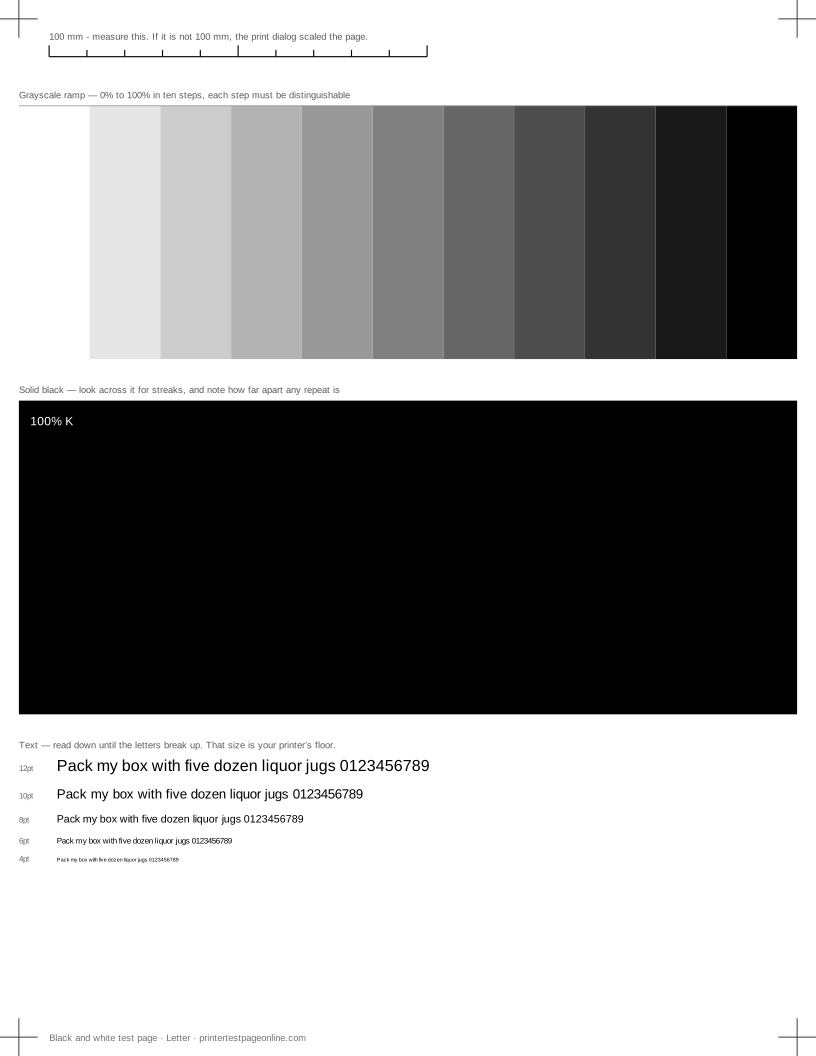
It is the right test for a mono laser, for an inkjet that is being used mostly for documents, and for any complaint that starts with "the text looks wrong".
What this sheet prints
| Block | Height | Inks used | Shows |
|---|---|---|---|
| Registration marks | 12 mm | C, M, Y, K | The grid lines or registration marks do not line up; The crop marks or edges are cut off |
| Grayscale ramp | 72 mm | K | Everything prints pale or washed out; Bands of uneven density in the ramp or colour fields |
| Solid black | 88 mm | K | Horizontal streaks or lines across the solid blocks; Bands of uneven density in the ramp or colour fields; Ink or toner smudges when you touch it |
| Text sharpness | 30 mm | K | Small text is fuzzy or has a shadow beside it; Ink or toner smudges when you touch it |
The sheet uses 220 mm of the 269.4 mm printable height on Letter, inside a 5 mm margin — the tightest edge most consumer printers can hold. It is also available as a Letter PDF and an A4 PDF.
The solid black block
A solid block is the most revealing thing you can print, because any unevenness has nowhere to hide. Hold the sheet at an angle to the light and look across it. It should be uniformly dense, with no lighter horizontal lines, no lighter patches at one side and no visible texture.
Lines across the block mean blocked nozzles on an inkjet and a marked drum or dirty roller on a laser. The useful thing to do before ordering anything is to measure the distance between repeats: a laser fault that repeats every 94 mm comes from a component with that circumference, and that identifies the part.
The grayscale ramp
Eleven steps run from paper white to solid black. Every step must be distinguishable from the one beside it. Steps that merge at the dark end mean the printer is laying down too much toner or ink and losing shadow detail; steps that merge at the light end mean the opposite, and usually point at a driver set to draft or an economy mode.
The ramp is also the fastest way to spot banding, because a slight density variation that is invisible on text shows clearly as a stripe across a mid-grey step.
The text block
The text runs 12pt, 10pt, 8pt, 6pt and 4pt. Read down until the letters stop being legible — that size is your printer’s practical floor on this paper, and it is worth knowing before you set a document in 8pt and print two hundred copies.
Letters that have a faint shadow on one side, rather than simply being small, point at bidirectional alignment on an inkjet: the head is laying ink down in both directions of travel and the two passes do not agree. Run the alignment page next.
Toner and ink saving modes
Most drivers have an economy mode, and most of them are on by default on office hardware. It halves the density, which is exactly what you do not want when you are trying to judge quality. Turn it off, reprint, and compare the two sheets side by side — the difference is usually larger than people expect, and it is the cheapest print-quality improvement available.
Other test pages
- CMYK test page
- Grayscale test page
- Nozzle check test page
- Printer alignment test page
- Text sharpness test page
- Laser printer test page
If the sheet shows a fault
Frequently asked questions
Why is my black printing grey?
Draft or economy mode is the first thing to check, then the media type setting — plain paper settings lay down less ink than photo settings. If both are right, the cartridge is low or, on an inkjet that mixes black from colour inks for plain paper, one colour channel is weak.
The text is fuzzy but the solid block is fine. Why?
That combination points at alignment or resolution rather than ink supply. Print the alignment page and run the printer’s head-alignment routine, and check that quality is set to Normal or Best rather than draft.
Does this test work on a colour printer?
Yes, and it is worth printing on one. If the black and white sheet is clean and colour pages are not, the fault is in a colour channel; if this sheet is bad too, the problem is in the paper path or the black channel and affects everything.