
Printer not printing colour
When colour goes wrong, the useful question is not "why is my printer broken" but "which channel failed". A CMYK test page answers it in one sheet: each ink prints on its own line at three strengths, so a missing or weak channel identifies itself instead of hiding inside a photograph.
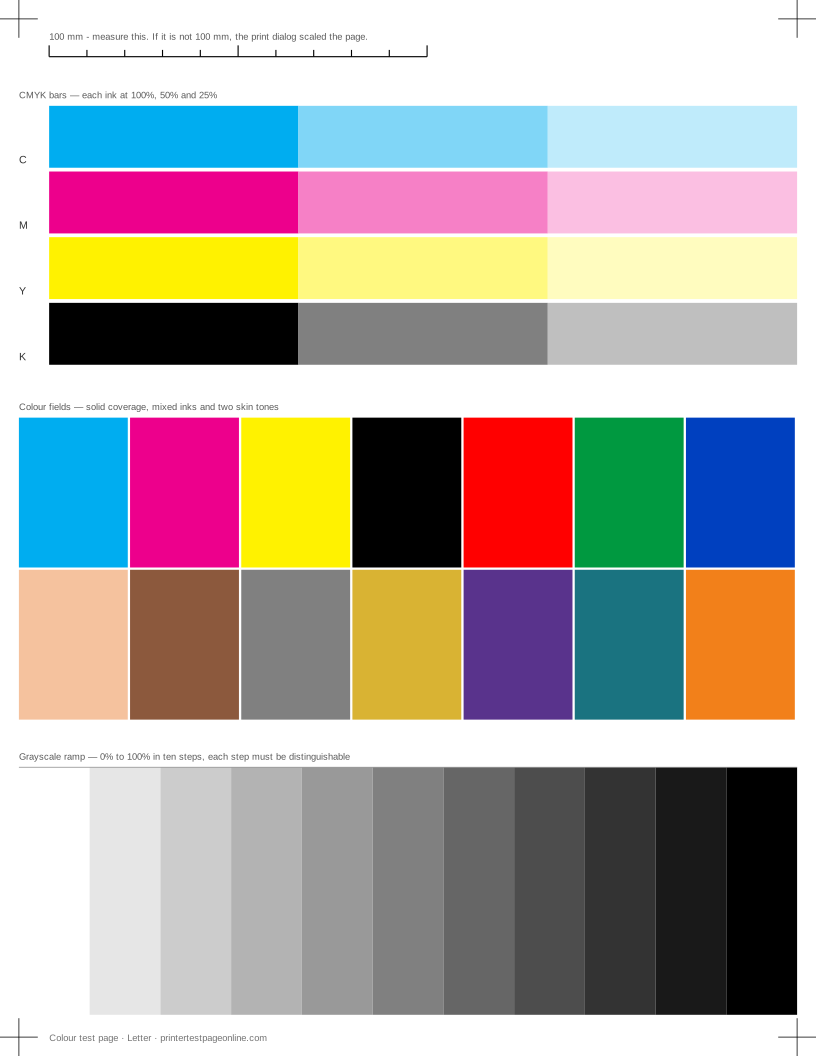
Print the colour test below, then match what you see to the causes here.
Nothing colour prints at all
Check the driver first. Grayscale, Print in black and white, Black ink only and Monochrome are all names for the same setting, and it exists in the print dialog, in the driver defaults and sometimes in the printer’s own menu. A printer set to monochrome in its front panel will ignore a colour job from any application.
If all three colour bars are missing and the setting is off, the colour cartridges are empty, unrecognised, or the printer is in an ink-saving mode. A page where black prints perfectly rules out most hardware faults immediately.
One colour missing
Reseat that cartridge until it clicks and reprint — cartridges that are not fully home are common and free to fix. If the bar is still blank, print the nozzle check. A blank row there means the channel is clogged, which is a cleaning job. A normal row with a blank bar means the cartridge is empty or the printer is not reading its chip.
Colours print but they are wrong
This is a different fault from a missing channel and it usually is not the printer. Check that quality is not set to draft, that the media type matches the paper, and that the application is not applying a colour profile of its own. Print the same image from a different application as a test.
If the CMYK bars are all present but one looks weak compared with its neighbours, that channel is printing at reduced coverage and every mixed colour will be shifted away from it — a cyan that is down makes everything look warm. Cleaning that channel usually restores it.
Third-party and refilled ink
Compatible ink often prints at full coverage while being a different pigment from the original, which shifts every colour built from it. If colours went wrong immediately after a cartridge change and the bars are all present and solid, the ink itself is the most likely explanation. It is not a fault you can clean out.
Causes, cheapest first
One colour is missing from the CMYK bars
| Cause | What to do | Applies to |
|---|---|---|
| That cartridge is empty or not seated | Reseat the cartridge until it clicks, then reprint. Replace it if the bar is still blank. | both |
| The protective tape is still on a new cartridge | Remove the cartridge and check for an orange or clear tab over the outlet. | both |
| That channel is fully clogged | Run print-head cleaning, then print a nozzle check to confirm the channel came back. | inkjet |
Colours print, but the wrong shade
| Cause | What to do | Applies to |
|---|---|---|
| The document and the driver disagree about colour | Print this sheet from the browser with colour management left at the default; if it is right here and wrong in your document, the fault is in the document’s profile, not the printer. | both |
| Third-party or refilled ink does not match the original | Compare the CMYK bars against the screen. Off-hue bars with full coverage point at the ink, not the head. | both |
| One channel is laying down less ink than the others | Print a nozzle check: a weak channel shifts every mixed colour towards its opposite. | both |
More troubleshooting
Frequently asked questions
Why does my printer print black but not colour?
Usually a grayscale or black-only setting in the driver or the printer menu. If that is off, the colour cartridges are empty, unrecognised, or all three channels are blocked — the CMYK test page tells you which.
How do I know which cartridge is the problem?
Print the CMYK test page. Each ink has its own row, so a missing or weak row names the cartridge without any guessing.
My colours are wrong but nothing is missing. Why?
Draft mode, the wrong media type, a colour profile applied by the application, or third-party ink with a different pigment. Check the driver settings before suspecting the hardware.