
CMYK test page
CMYK is how a printer builds every colour it produces: cyan, magenta and yellow inks laid over each other, with black doing the heavy lifting on text and shadow. A CMYK test page separates those four channels so you can see each one on its own instead of guessing from a mixed colour.
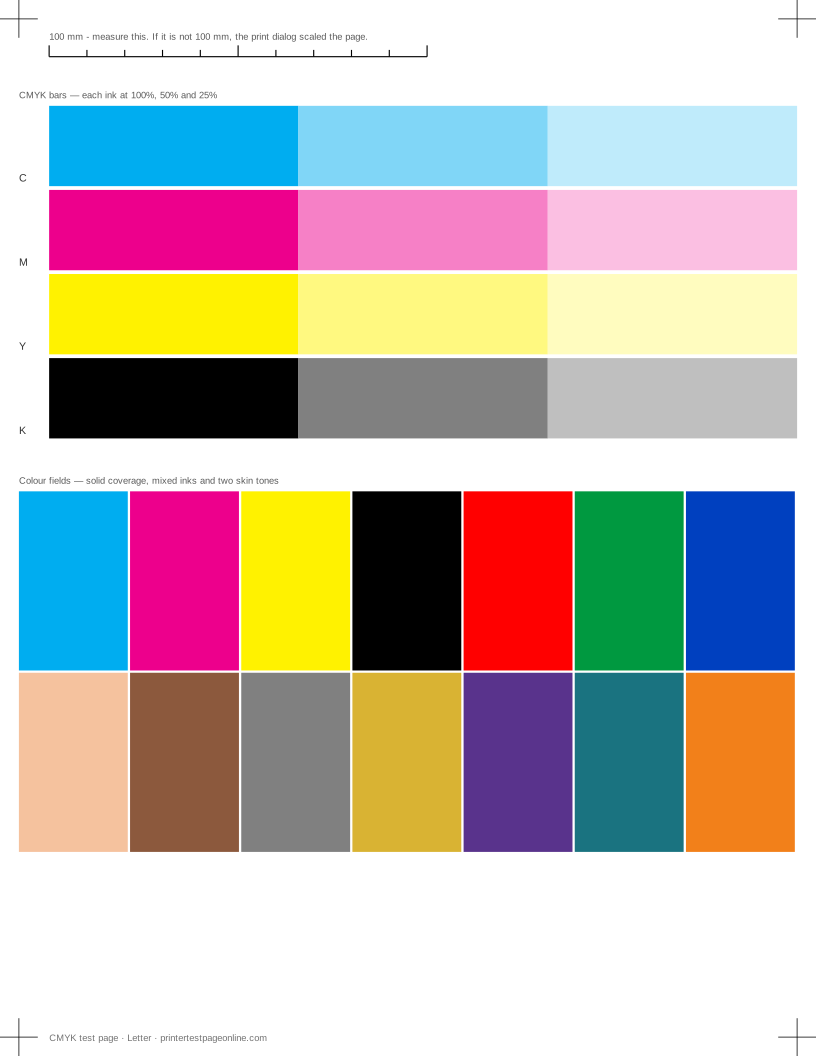
This is the sheet to print when you want to know which cartridge is the problem, and the one to keep when you want a reference print to compare against in six months.
What this sheet prints
| Block | Height | Inks used | Shows |
|---|---|---|---|
| Registration marks | 12 mm | C, M, Y, K | The grid lines or registration marks do not line up; The crop marks or edges are cut off |
| CMYK bars | 96 mm | C, M, Y, K | One colour is missing from the CMYK bars; Colours print, but the wrong shade |
| Colour fields | 102 mm | C, M, Y, K | Everything prints pale or washed out; Bands of uneven density in the ramp or colour fields; Colours print, but the wrong shade |
The sheet uses 222 mm of the 269.4 mm printable height on Letter, inside a 5 mm margin — the tightest edge most consumer printers can hold. It is also available as a Letter PDF and an A4 PDF.
What each row is showing
Every ink prints three tints: full coverage, 50% and 25%. The full patch tells you whether the channel is reaching the paper at all. The two lighter tints tell you whether it is being metered correctly, because a printer builds a tint from a pattern of small dots and a partly blocked nozzle shows up in that pattern long before it shows in a solid.
Yellow is the hardest row to judge by eye, especially under warm light. Tilt the sheet and look for the edge of the patch rather than its middle.
Using CMYK bars to identify a cartridge
A missing row identifies the cartridge directly, which saves buying a whole set. Reseat that cartridge first and reprint: cartridges that are not fully clicked into place are a common and free fix. If the row stays blank, print the nozzle check to separate an empty cartridge from a clogged channel.
On a colour laser, a missing row usually means the toner cartridge is finished, has a transport lock still fitted, or its drum unit has failed. Laser toner does not clog, so cleaning cycles have nothing to clear.
Registration between channels
The four inks are laid down in separate passes and must land in the same place. Look at the edges where two colour fields meet: a thin fringe of a third colour along the boundary means the channels are not registering, which on a laser points at the transfer belt or a worn drum, and on an inkjet points at head alignment.
The alignment page makes this easier to see, because it prints cyan and magenta diagonals that have to cross exactly on the grid.
Why this is not a colour-accuracy test
A CMYK test page is a diagnostic, not a calibration. It tells you whether a channel is present and even. It cannot tell you that your cyan is the right cyan, because that depends on the ink, the paper, the light you are looking at it under, and the colour profile the job was sent with. If colour accuracy is what you need, print this sheet to prove the hardware is healthy first — a profiling run on a printer with a blocked nozzle is wasted work.
Other test pages
- Grayscale test page
- Nozzle check test page
- Printer alignment test page
- Text sharpness test page
- Laser printer test page
- Printer test page PDF
If the sheet shows a fault
Frequently asked questions
What does CMYK stand for?
Cyan, magenta, yellow and key — key being black. They are the four process inks almost every colour printer uses. The K avoids any confusion with the B of RGB.
My printer has six or eight cartridges. Does this still apply?
Yes. Photo printers add light cyan, light magenta, grey or a second black, but those are extra tints of the same four channels. If a CMYK bar is missing, the base cartridge for that channel is the one to look at first.
The 25% tint looks grainy. Is that a fault?
Some graininess is normal at low coverage on plain paper, because the printer is placing individual dots with space between them. It is a fault when one channel is noticeably grainier than the other three, which usually means that channel is partly blocked.