
Color printer test page
A colour test page answers one question quickly: is every ink reaching the paper, and is it reaching it at the right strength? The sheet below prints each process ink at 100%, 50% and 25% coverage, a row of solid colour fields, two skin tones and a grayscale ramp, so a weak or missing channel shows up on its own line instead of hiding inside a photograph.
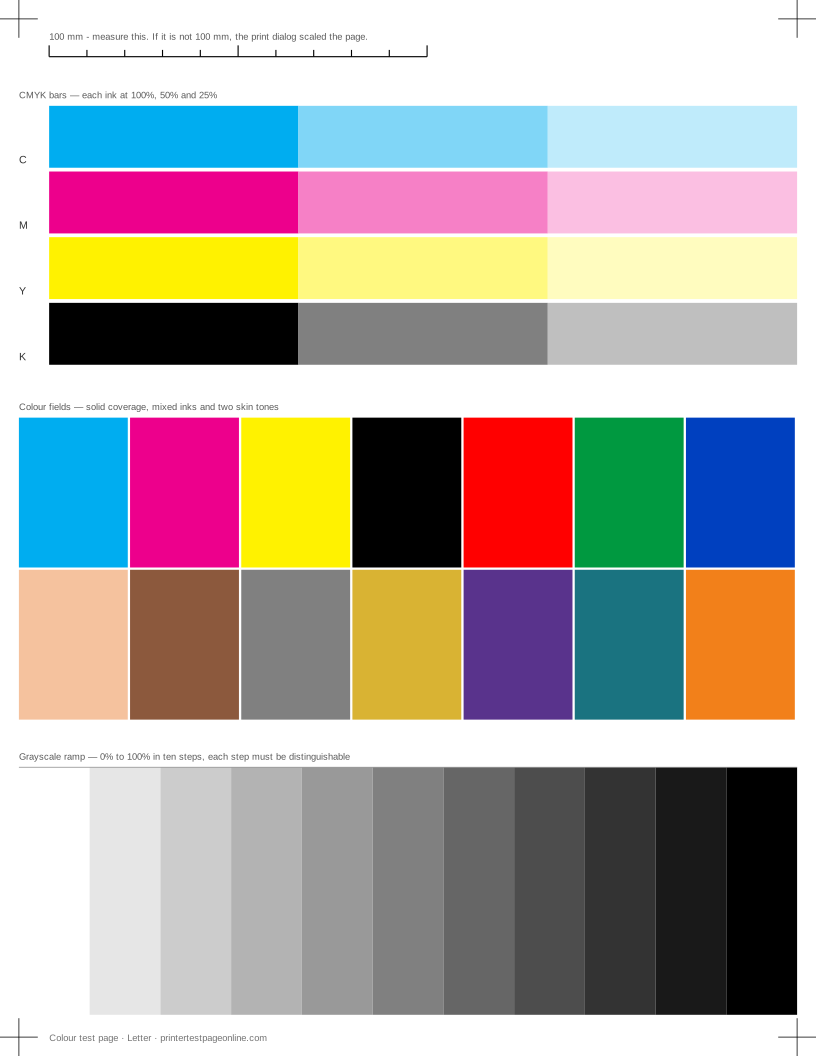
Print it on the paper that is in the tray, at 100% scale. It works on any colour inkjet or colour laser, with no software to install.
What this sheet prints
| Block | Height | Inks used | Shows |
|---|---|---|---|
| Registration marks | 12 mm | C, M, Y, K | The grid lines or registration marks do not line up; The crop marks or edges are cut off |
| CMYK bars | 76.5 mm | C, M, Y, K | One colour is missing from the CMYK bars; Colours print, but the wrong shade |
| Colour fields | 86.5 mm | C, M, Y, K | Everything prints pale or washed out; Bands of uneven density in the ramp or colour fields; Colours print, but the wrong shade |
| Grayscale ramp | 70.5 mm | K | Everything prints pale or washed out; Bands of uneven density in the ramp or colour fields |
The sheet uses 263.5 mm of the 269.4 mm printable height on Letter, inside a 5 mm margin — the tightest edge most consumer printers can hold. It is also available as a Letter PDF and an A4 PDF.
Reading the CMYK bars
Each ink prints three segments: full coverage, half and a quarter. Read them left to right. The full segment should be dense and even, the half clearly lighter, the quarter clearly lighter again. If all three segments of one ink are missing, that cartridge is empty, not seated, or still has its shipping tape on. If the full segment is there but broken by pale lines, that channel is partially blocked and a cleaning cycle is the next step.
Compare the bars against each other rather than against your memory of what cyan looks like. Paper, lighting and ink age all shift the absolute colour, but a bar that is weak relative to its three neighbours is a genuine fault.
What the colour fields and skin tones are for
Solid fields show coverage problems that the bars can miss: a field should be flat, with no banding across it and no mottling. The two skin tones are there because they are built from small amounts of several inks at once, which makes them the first thing to go wrong when one channel is printing weakly. A skin tone that has drifted pink or green while the individual ink bars look fine almost always means one channel is down by a fraction rather than out entirely.
The grayscale ramp at the bottom is a colour test too. On a printer that mixes grey from colour inks rather than using black alone, a colour cast in the ramp points straight at the channel that is off.
Colour looks wrong but nothing is missing
If every bar prints and the fields are solid but the colours are not what you expected, the fault is usually not in the printer. Check that the print dialog is not applying a colour profile of its own, that the driver media setting matches the paper, and that quality is not set to draft — draft mode lays down far less ink and shifts every mixed colour.
Third-party and refilled inks are the other common cause. They print at full coverage and look perfectly healthy on the bars while being a different pigment from the original, which shifts every colour built from them.
When to print this instead of the full test page
Print the colour test when the complaint is about colour: a photo that came out wrong, a logo that is not the right red, a page that looks washed out. It uses less ink than the full page and gives a cleaner answer because there is nothing else on the sheet to distract you.
If the complaint is about text, lines or smudging rather than colour, the black and white test page is the better sheet, and the nozzle check is the one to print when you suspect a clog.
Other test pages
- Black and white printer test page
- CMYK test page
- Grayscale test page
- Nozzle check test page
- Printer alignment test page
- Text sharpness test page
If the sheet shows a fault
Frequently asked questions
Why does my colour test page print in black and white?
Check Print in grayscale, Black ink only or Monochrome in the print dialog, then the same setting in the driver defaults. If both are off and the page is still grey, the colour cartridges are empty or the printer has been set to a black-only mode in its front panel.
One colour bar is completely missing. Is the cartridge empty?
Not necessarily. Reseat it until it clicks and reprint. If it is still missing, print the nozzle check: a blank row there means the channel is clogged rather than empty, which is a cleaning job, not a purchase.
The colours look duller than on screen. Is that a fault?
Usually not. A screen emits light and covers a wider colour range than ink on paper can; saturated blues and greens in particular cannot be reproduced exactly. Judge the print against the other blocks on the same sheet, not against the monitor.
Does this work on a colour laser printer?
Yes. The bars, fields and ramp all apply. The one block that does not is the nozzle check, which is an inkjet concept — a laser has no nozzles, so its equivalent fault shows up as streaks or a repeating mark on the solid fields instead.