
Print head cleaning: how many cycles, and when to stop
A cleaning cycle forces ink through the print head to push out whatever is blocking it. It works, and it is the right first move for a gap in a nozzle check — but each cycle uses a measurable amount of ink, and running them back to back is how people empty a cartridge trying to fix a cartridge.
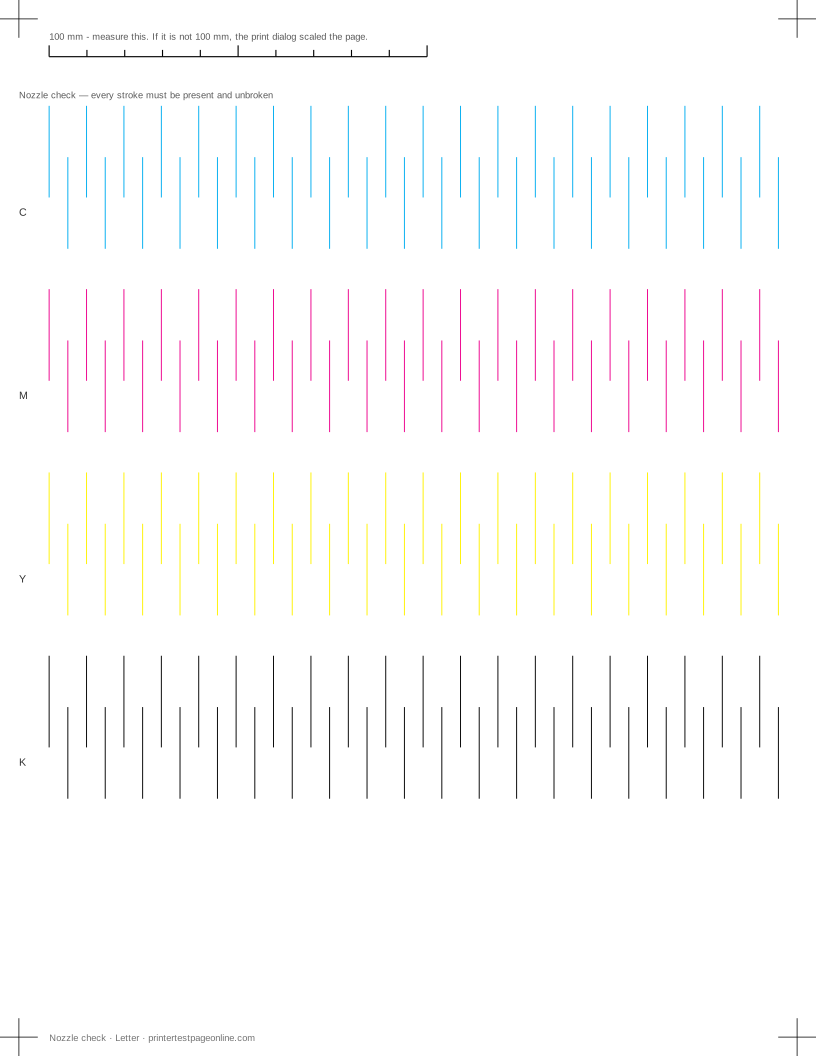
Print the nozzle check below before and after every cycle. Without that comparison you are cleaning blind.
The sequence that costs least
Print a nozzle check and keep it. Run one standard cleaning cycle. Print another nozzle check and compare. If it improved but is not clear, run one more. If it is clear, stop. If two cycles produced no change at all, stop — a third will not help either.
When cleaning has stalled, leave the printer switched on and idle overnight. The head sits capped against fresh ink, which softens dried pigment far more effectively than another flush. Run one cycle in the morning. This recovers a large share of the clogs that cleaning alone cannot.
Standard, deep and power cleaning
Manufacturers offer escalating levels — deep clean, power clean, ink charging — and the ink cost rises steeply with each. Use the standard cycle first and escalate only when the standard cycle made a visible partial improvement, because that is evidence the blockage is shifting.
A power clean on a printer that showed no improvement from two standard cleans is usually just an expensive way to reach the same conclusion.
When cleaning cannot work
Cleaning clears dried ink. It does nothing for an empty cartridge, a cartridge the printer will not recognise, an air lock in an ink line, or a head that has physically failed. The nozzle check tells these apart: gradual fading along a row points at supply, a sharp complete loss of one row points at recognition or an air lock, and scattered missing strokes point at a genuine clog.
Laser printers have no nozzles and no cleaning cycle of this kind. Their equivalent routines clean the drum or calibrate colour, and they do not address the same faults.
Manual cleaning, carefully
On printers with a removable head, soaking the head in warm distilled water is a known last resort and can recover a head that cycles could not. It also destroys heads when done with hot water, tap water or solvent, and it is the point at which a warranty ends. It is worth trying only when the alternative is replacing the printer.
Do not attempt it on a printer whose head is built into the cartridge. Fitting a new cartridge achieves the same thing with no risk.
Preventing the next clog
Print something in colour at least once a fortnight, even if it is only the nozzle check. Always power the printer down with its own button so the head is capped. Keep it out of direct sunlight and away from heat, which dries ink in the head faster than anything else in a normal room.
Causes, cheapest first
Broken or missing lines in the nozzle-check grid
| Cause | What to do | Applies to |
|---|---|---|
| Dried ink is blocking some nozzles | Run one print-head cleaning cycle, print the nozzle check again, and stop after three cycles — more wastes ink and rarely helps. | inkjet |
| A cartridge is nearly empty | Check levels in the driver and replace the low cartridge before cleaning again. | both |
| Air has entered the ink line | Run a power clean (deep clean) once, then leave the printer idle for an hour and retest. | inkjet |
More troubleshooting
Frequently asked questions
How many times should I clean the print head?
Up to three cycles in a session, with a nozzle check between each. If three have not cleared it, leave the printer idle overnight and try once more rather than continuing.
How much ink does print head cleaning use?
Enough to matter — a single standard cycle typically consumes several pages worth, and a deep or power clean considerably more. That is why the nozzle check between cycles is not optional.
Does print head cleaning damage the printer?
The cycles themselves do not, but they fill the waste ink pad, which has a finite capacity and on some printers eventually stops the machine with a service message.
Can I clean a print head with alcohol?
Alcohol and other solvents can damage nozzle plates and seals. Warm distilled water is the only thing worth trying on a removable head, and only as a last resort before replacing the printer.